07 April 2011

Nebraska Code Camp

Are you looking to get your geek on this weekend?  Are you in the general neighborhood of Lincoln, NE?  If so, then you will want to attend the Nebraska Code Camp this Saturday, April 9th at the University of Nebraska, Lincoln.

As always, the Code Camp is free and there a lots of great sessions scheduled covering a wide variety of topics.

Date: Saturday, April 9th
Start Time: 08:45 (registration opens at 08:00)
Location: University of Nebraska-Lincoln in Avery Hall

Check out the links below for more information.

18 March 2011

Visual Studio Setup Projects being Sunset

If you currently make use of Visual Studio Setup Projects (.vdproj), you may want to start thinking about a transition plan for the future.  As Buck Hodges stated on his blog yesterday (link), Visual Studio Setup Projects will not ship in the next release of Visual Studio.

He recommends (and I agree) looking into WiX – the same installer technology used to create the installation packages for Visual Studio and other miscellaneous Microsoft tools.  If you’re interested in looking at other options, check out the MSDN page Choosing a Windows Installer Deployment Tool.

I, for one, am not sad to see the Visual Studio Setup Projects go by the wayside.  However, I would like to see first-class support for WiX within Visual Studio.

Read the full details here.

OTSUG – What is Visual Studio ALM?

Please join us on Tuesday, March 22nd as Mike Douglas presents on “What is Visual Studio ALM?”  If you are not familiar with the various ALM features in Visual Studio 2010 and TFS 2010, this will be a great opportunity to see these features demonstrated.  You will also have the chance to ask any questions that you may have regarding the Visual Studio ALM tools.

Visit the Omaha Team System User Group web site for complete meeting details.

We hope to see you there!

08 March 2011

TFS Project Server Integration Feature Pack

The TFS Project Server Integration Feature Pack has been in beta for a few months now.  As of today, it is being released into the wild and is now ready for download from the MSDN Subscribers site.

As seen on Brian Harry’s blog post, the TFS Project Server Integration Feature Pack enables teams to work together more effectively by:

  • Providing up to date insight into portfolio execution, alignment with strategic objectives, and resource utilization of software development projects by leveraging the quantitative data stored in different systems.
  • Automating the exchange and sharing of project information across teams and improving coordination between teams using disparate methodologies, like waterfall and agile, via common data and agreed upon metrics.
  • Enabling development and project management teams to use familiar tools to collaborate and communicate project timeline and progress such as Microsoft Visual Studio, Project, and SharePoint.

More Information

You can find more information regarding this release via these links:

Download Links

  • As of today, you can download the TFS Project Server Integration Pack from the MSDN Subscribers site.

Visual Studio Load Test Feature Pack

Last August, Microsoft announced they would be including the lab agents (i.e. licenses) with TFS 2010 as well as Visual Studio 2010 Ultimate with MSDN and Visual Studio 2010 Test Professional with MSDN (link).  As of today, Microsoft has made another great licensing announcement – the Visual Studio Load Test Virtual User Feature Pack 2010.

With this feature pack, you can simulate as many virtual users as you like without the need for purchasing additional virtual user licenses.  This change only adds to the already great value provided with the Visual Studio 2010 Ultimate with MSDN subscription.

More Information

You can find more information regarding this release via these links:

Visual Studio/TFS 2010 SP1 Released

Service Pack 1 has been officially released for Visual Studio 2010 and Team Foundation Server 2010.  The download is immediately available on the MSDN Subscribers Site.  The service pack will be publicly available on the Microsoft Downloads site on March 10th, 2011.

There are several new features included with this service pack, including (but not limited to):

Visual Studio

Team Foundation Server

  • Core changes to support future Feature Packs, such as the Visual Studio Team Foundation Server 2010 and Project Server Integration Feature Pack.
  • Lots of bug fixes

More Information

You can find more information regarding this release via these links:

Download Links

  • As of today, you can download Service Pack 1 here
  • As of Thursday, March 10th, you can download Service Pack 1 here

04 March 2011

March 2011 Team Foundation Server Power Tools

The latest version (March 2011) of the Team Foundation Server 2010 Power Tools are now available and can be downloaded via the following links:

The primary enhancements in this release include:

  • Addressed reported issues in the Backup/Restore Power Tool (yeah!). After the initial release of the Backup/Restore Power Tool, there were several issues that made the tool questionable to use in some cases.  These issues have now been resolved (over 40 bugs fixed!).
  • Fleshed out the Windows Shell Extension for version control (double-yeah!)  The Windows shell extension for TFS version control commands has been around for a while albeit with limited functionality.  This release fills out the shell extension with practically every version control command available within the Visual Studio UI.  If you prefer working with version control from within Windows Explorer, this will be a great addition!
  • Took the first step on the path to a bunch of new TFS Build Power Tools (???)  What does this mean, exactly?  As Brian’s post points out (link below), they now have the team responsible for building the internal build tools helping out with the Power Tools.  Based on these comments, it appears they intend to make some of these tools (or some derivative) available in future Power Tools releases.  I had the pleasure of seeing some of these tool demonstrated a couple of days ago and they are simply amazing.

For the full details of this release, check out Brian’s posts, here.

03 March 2011

MVP Global Summit 2011 Comes to a Close

This year marks my third consecutive Microsoft MVP Global Summit.  Each year seems to be a little bit better than the last.  However, this year was a lot better than last year’s summit – mainly due to the timing of products and content of the sessions.  Although there was lots to see and discuss, the content is under NDA so not much can be discussed.

However, one thing is certain, working with the Visual Studio/ALM product groups is nothing short of amazing.  Having been an MVP for close to three years now (first a Team Foundation Server MVP and now a Visual Studio ALM MVP) I can’t imagine being grouped with a better bunch of people (including my fellow MVPs and the Microsoft Product Group members).

Here’s the group of Visual Studio ALM MVPs that made it to the summit this year:

2011 Visual Studio ALM MVPs

I look forward to seeing everyone again next year!

03 February 2011

Free Visual Studio/ALM Training

A fellow Visual Studio ALM MVP, Martin Hinshelwood, who also happens to be an employee of Northwest Cadence, recently posted a list of training (“coffee”) talks offered for free.  Here is the currently scheduled list of talks:

Coffee Talks

These coffee talks have some superb topics and you can get excellent interaction with the presenter as they are kind of informal.

Date

Day

Time

Topic

Register Here

01/04/11

Tuesday

8:30AM – 9:30AM PST

Real World Business and Technical Benefits of ALM with TFS 2010

150656

01/28/11

Friday

9:00AM - 10:00AM PST

The Full Testing Experience

Professional Quality Assurance with Visual Studio 2010

Register for Coffee Talk: The Full Testing Experience- Professional Quality Assurance with Visual Studio2010 on Eventbrite

02/11/11

Friday

9:00AM - 10:00AM PST

Visual Source Safe to Team Foundation Server

152844

02/25/11

Friday

2:00PM - 3:00PM PST

The Full Testing Experience

Professional Quality Assurance with Visual Studio 2010

Register for Coffee Talk: The Full Testing Experience- Professional Quality Assurance with Visual Studio2010 on Eventbrite

03/11/11

Friday

9:00AM - 10:00AM PST

Lab Manager

The Ultimate “No More No Repro” Tool

152809

03/25/11

Friday

9:00AM - 10:00AM PST

The Full Testing Experience

Professional Quality Assurance with Visual Studio 2010

Register for Coffee Talk: The Full Testing Experience- Professional Quality Assurance with Visual Studio2010 on Eventbrite

04/08/11

Friday

9:00AM - 10:00AM PST

Visual Source Safe to Team Foundation Server

152846

04/22/11

Friday

9:00AM - 10:00AM PST

The Full Testing Experience

Professional Quality Assurance with Visual Studio 2010

Register for Coffee Talk: The Full Testing Experience- Professional Quality Assurance with Visual Studio2010 on Eventbrite

05/06/11

Friday

2:00PM - 3:00PM PST

Real World Business and Technical Benefits of ALM with TFS 2010

150657

05/20/11

Friday

9:00AM - 10:00AM PST

The Full Testing Experience

Professional Quality Assurance with Visual Studio 2010

Register for Coffee Talk: The Full Testing Experience- Professional Quality Assurance with Visual Studio2010 on Eventbrite

06/03/11

Friday

9:00AM - 10:00AM PST

Visual Source Safe to Team Foundation Server

152847

06/17/11

Friday

9:00AM - 10:00AM PST

The Full Testing Experience

Professional Quality Assurance with Visual Studio 2010

Register for Coffee Talk: The Full Testing Experience- Professional Quality Assurance with Visual Studio2010 on Eventbrite


There is also a program called the ALM Training Engagement Program which is free but requires a little bit more of an up-front commitment than the talks above.

Refer to Martin’s post for complete details regarding these sessions.

27 January 2011

Visual Studio Code Metrics PowerTool 10.0

Visual Studio Code Metrics (Current Functionality)

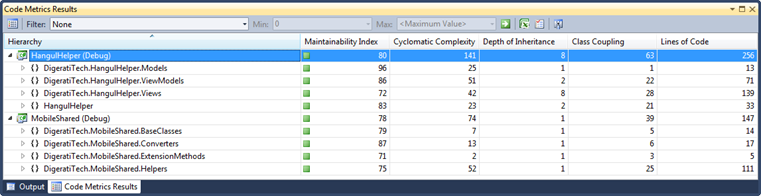
Code Metrics was introduced in Visual Studio 2008.  This feature allows developers to calculate various code metrics for projects and solutions.  This feature calculates five separate metrics:

  1. Maintainability Index [higher=better]– Calculates an index value between 0 and 100 that represents the relative ease of maintaining the code. A high value means better maintainability. Color coded ratings can be used to quickly identify trouble spots in your code. A green rating is between 20 and 100 and indicates that the code has good maintainability. A yellow rating is between 10 and 19 and indicates that the code is moderately maintainable. A red rating is a rating between 0 and 9 and indicates low maintainability.
  2. Cyclomatic Complexity [lower=better] - Measures the structural complexity of the code. It is created by calculating the number of different code paths in the flow of the program. A program that has complex control flow will require more tests to achieve good code coverage and will be less maintainable.
  3. Depth of Inheritance [lower=better] - Indicates the number of class definitions that extend to the root of the class hierarchy. The deeper the hierarchy the more difficult it might be to understand where particular methods and fields are defined or/and redefined.
  4. Class Coupling [lower=better] - Measures the coupling to unique classes through parameters, local variables, return types, method calls, generic or template instantiations, base classes, interface implementations, fields defined on external types, and attribute decoration. Good software design dictates that types and methods should have high cohesion and low coupling. High coupling indicates a design that is difficult to reuse and maintain because of its many interdependencies on other types.
  5. Lines of Code [lower=better] - Indicates the approximate number of lines in the code. The count is based on the IL code and is therefore not the exact number of lines in the source code file. A very high count might indicate that a type or method is trying to do too much work and should be split up. It might also indicate that the type or method might be hard to maintain.

[Read more about code metrics in Visual Studio 2010 here.]

So, we have code metrics, what’s the problem?  Well, you can view code metrics in Visual Studio (see image below), however, there is no way to calculate a project’s or solution’s code metrics outside of Visual Studio.  That is, until now…
image

Visual Studio Code Metrics Power Tool (New Functionality)

With the introduction of the Visual Studio Code Metrics Power Tool, you can now calculate code metrics for a set of assemblies via the command line.  The various metrics will be saved to an XML file.

To run code metrics via the command line:

  1. Download and install the Visual Studio Code Metrics Power Tool.
  2. Open a Windows command prompt.
  3. Change to the following folder: C:\Program Files\Microsoft Visual Studio 10.0\Team Tools\Static Analysis Tools\FxCop (or add it to your PATH environment variable).
  4. Run metrics.exe /? to see the command usage.
Example: Run code metrics for all DLLs

metrics.exe /f:*.dll /out:metrics.xml

This will calculate code metrics for all DLLs (in the current folder) and save the resulting code metrics to the XML file metrics.xml.  There are several other options not shown here which you can see if you run metrics.exe /? to view the command usage.

So, Now What?

Now that we have the ability to calculate code metrics outside of Visual Studio, what can it be used for?  Well, I am sure there are lots of reasons that you and everyone else will come up with.  A few possible cases for using this newfound functionality might include:

  • Generate code metrics during an automated build and store the results along with everything else in the drop folder (or where ever makes the most sense for your situation).
  • Create a custom build activity that automatically fails (completely or partially) a build if the code metrics exceed certain thresholds.
  • Build a custom Team Foundation Server 2010 Warehouse Adapter to house the resulting code metrics.
  • Whatever else you might think of…  If you have other great ideas for using code metrics, leave a comment.

Update: Cameron Skinner has posted more details regarding this release on his blog, here.