03 March 2011

MVP Global Summit 2011 Comes to a Close

This year marks my third consecutive Microsoft MVP Global Summit.  Each year seems to be a little bit better than the last.  However, this year was a lot better than last year’s summit – mainly due to the timing of products and content of the sessions.  Although there was lots to see and discuss, the content is under NDA so not much can be discussed.

However, one thing is certain, working with the Visual Studio/ALM product groups is nothing short of amazing.  Having been an MVP for close to three years now (first a Team Foundation Server MVP and now a Visual Studio ALM MVP) I can’t imagine being grouped with a better bunch of people (including my fellow MVPs and the Microsoft Product Group members).

Here’s the group of Visual Studio ALM MVPs that made it to the summit this year:

2011 Visual Studio ALM MVPs

I look forward to seeing everyone again next year!

03 February 2011

Free Visual Studio/ALM Training

A fellow Visual Studio ALM MVP, Martin Hinshelwood, who also happens to be an employee of Northwest Cadence, recently posted a list of training (“coffee”) talks offered for free.  Here is the currently scheduled list of talks:

Coffee Talks

These coffee talks have some superb topics and you can get excellent interaction with the presenter as they are kind of informal.

Date

Day

Time

Topic

Register Here

01/04/11

Tuesday

8:30AM – 9:30AM PST

Real World Business and Technical Benefits of ALM with TFS 2010

150656

01/28/11

Friday

9:00AM - 10:00AM PST

The Full Testing Experience

Professional Quality Assurance with Visual Studio 2010

Register for Coffee Talk: The Full Testing Experience- Professional Quality Assurance with Visual Studio2010 on Eventbrite

02/11/11

Friday

9:00AM - 10:00AM PST

Visual Source Safe to Team Foundation Server

152844

02/25/11

Friday

2:00PM - 3:00PM PST

The Full Testing Experience

Professional Quality Assurance with Visual Studio 2010

Register for Coffee Talk: The Full Testing Experience- Professional Quality Assurance with Visual Studio2010 on Eventbrite

03/11/11

Friday

9:00AM - 10:00AM PST

Lab Manager

The Ultimate “No More No Repro” Tool

152809

03/25/11

Friday

9:00AM - 10:00AM PST

The Full Testing Experience

Professional Quality Assurance with Visual Studio 2010

Register for Coffee Talk: The Full Testing Experience- Professional Quality Assurance with Visual Studio2010 on Eventbrite

04/08/11

Friday

9:00AM - 10:00AM PST

Visual Source Safe to Team Foundation Server

152846

04/22/11

Friday

9:00AM - 10:00AM PST

The Full Testing Experience

Professional Quality Assurance with Visual Studio 2010

Register for Coffee Talk: The Full Testing Experience- Professional Quality Assurance with Visual Studio2010 on Eventbrite

05/06/11

Friday

2:00PM - 3:00PM PST

Real World Business and Technical Benefits of ALM with TFS 2010

150657

05/20/11

Friday

9:00AM - 10:00AM PST

The Full Testing Experience

Professional Quality Assurance with Visual Studio 2010

Register for Coffee Talk: The Full Testing Experience- Professional Quality Assurance with Visual Studio2010 on Eventbrite

06/03/11

Friday

9:00AM - 10:00AM PST

Visual Source Safe to Team Foundation Server

152847

06/17/11

Friday

9:00AM - 10:00AM PST

The Full Testing Experience

Professional Quality Assurance with Visual Studio 2010

Register for Coffee Talk: The Full Testing Experience- Professional Quality Assurance with Visual Studio2010 on Eventbrite


There is also a program called the ALM Training Engagement Program which is free but requires a little bit more of an up-front commitment than the talks above.

Refer to Martin’s post for complete details regarding these sessions.

27 January 2011

Visual Studio Code Metrics PowerTool 10.0

Visual Studio Code Metrics (Current Functionality)

Code Metrics was introduced in Visual Studio 2008.  This feature allows developers to calculate various code metrics for projects and solutions.  This feature calculates five separate metrics:

  1. Maintainability Index [higher=better]– Calculates an index value between 0 and 100 that represents the relative ease of maintaining the code. A high value means better maintainability. Color coded ratings can be used to quickly identify trouble spots in your code. A green rating is between 20 and 100 and indicates that the code has good maintainability. A yellow rating is between 10 and 19 and indicates that the code is moderately maintainable. A red rating is a rating between 0 and 9 and indicates low maintainability.
  2. Cyclomatic Complexity [lower=better] - Measures the structural complexity of the code. It is created by calculating the number of different code paths in the flow of the program. A program that has complex control flow will require more tests to achieve good code coverage and will be less maintainable.
  3. Depth of Inheritance [lower=better] - Indicates the number of class definitions that extend to the root of the class hierarchy. The deeper the hierarchy the more difficult it might be to understand where particular methods and fields are defined or/and redefined.
  4. Class Coupling [lower=better] - Measures the coupling to unique classes through parameters, local variables, return types, method calls, generic or template instantiations, base classes, interface implementations, fields defined on external types, and attribute decoration. Good software design dictates that types and methods should have high cohesion and low coupling. High coupling indicates a design that is difficult to reuse and maintain because of its many interdependencies on other types.
  5. Lines of Code [lower=better] - Indicates the approximate number of lines in the code. The count is based on the IL code and is therefore not the exact number of lines in the source code file. A very high count might indicate that a type or method is trying to do too much work and should be split up. It might also indicate that the type or method might be hard to maintain.

[Read more about code metrics in Visual Studio 2010 here.]

So, we have code metrics, what’s the problem?  Well, you can view code metrics in Visual Studio (see image below), however, there is no way to calculate a project’s or solution’s code metrics outside of Visual Studio.  That is, until now…

image

Visual Studio Code Metrics Power Tool (New Functionality)

With the introduction of the Visual Studio Code Metrics Power Tool, you can now calculate code metrics for a set of assemblies via the command line.  The various metrics will be saved to an XML file.

To run code metrics via the command line:

  1. Download and install the Visual Studio Code Metrics Power Tool.
  2. Open a Windows command prompt.
  3. Change to the following folder: C:\Program Files\Microsoft Visual Studio 10.0\Team Tools\Static Analysis Tools\FxCop (or add it to your PATH environment variable).
  4. Run metrics.exe /? to see the command usage.
Example: Run code metrics for all DLLs

metrics.exe /f:*.dll /out:metrics.xml

This will calculate code metrics for all DLLs (in the current folder) and save the resulting code metrics to the XML file metrics.xml.  There are several other options not shown here which you can see if you run metrics.exe /? to view the command usage.

So, Now What?

Now that we have the ability to calculate code metrics outside of Visual Studio, what can it be used for?  Well, I am sure there are lots of reasons that you and everyone else will come up with.  A few possible cases for using this newfound functionality might include:

  • Generate code metrics during an automated build and store the results along with everything else in the drop folder (or where ever makes the most sense for your situation).
  • Create a custom build activity that automatically fails (completely or partially) a build if the code metrics exceed certain thresholds.
  • Build a custom Team Foundation Server 2010 Warehouse Adapter to house the resulting code metrics.
  • Whatever else you might think of…  If you have other great ideas for using code metrics, leave a comment.

Update: Cameron Skinner has posted more details regarding this release on his blog, here.

21 December 2010

My First Published Windows Phone 7 Apps

Like many other developers out there (there’s over 18,000 registered developers so far) I decided to take a try at writing some applications for Microsoft’s new Windows Phone 7.  I decided to create two simple applications (to start with) – one for free and the other to (try to) sell for $0.99 (USD).  The details for each application is included below.  But first, a few lessons learned.

Lessons Learned

“Twas the Night Before Christmas”

For my first free published application, I decided to take the near-200 year old poem “A Visit from St. Nicholas”, also known as “Twas the Night Before Christmas” and make it available for reading as an off-line Windows Phone 7 application.  With Christmas Eve fast approaching, it seemed like a simple choice :-)

This application allowed me to make use of the Windows Phone Browser Control as well as the Pivot Control.  Probably the biggest challenge with this application was getting the Browser Control to properly read the embedded HTML and image files.  As it turns out, you have to copy the files to Isolated Storage (this only needs to be performed once) before the browser control can directly access them.

Once you install and run the application, you have the option of reading the Introduction, the actual Story, and the Credits (i.e. copyright notice).  Here are a few screen shots:

Twas_Introduction_lightTwas_Story_lightTwas_Credits_light

Read the full application details and/or download the application here.

SafetyTip

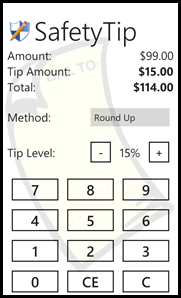
For my first “non-free” application, I decided to port an application I had originally written for Windows Mobile 6.0 – SafetyTip.  Although the user interface code did not directly port (not even close :-), the underlying business logic ported just fine – since it was c# code.

This application is not just another tip calculator but rather calculates what I like to call “visually verifiable” tips.  In other words, it will generate a tip that, when added to the original amount, will total up to an amount that can be visually verified by looking at it.  For example, one of the methods available for selection is “Palindrome”.  This method ensures the "cents" digits are the reverse of the first two "dollar" digits.  For example, in the screen shots below, you can see that the tip calculated for $100 using this method (at 15%) is 15.51.  Add this to the total for $115.51.  Note how the "cents" digits, ".51" is the reverse of the first two "dollars" digits, "15".  If you get your credit/debit card statement and these sets of digits are not reversed, then you know you should probably check into what's going on.

This application provided me the opportunity to work with the Silverlight for Windows Phone Toolkit.  I utilized the ListPicker control from the toolkit to list the various tip calculation methods (there are a total of four).  Working with this toolkit is simple and there are various examples to learn from.

Here are a few screen shots of the application:

ST_Palindrome_lightST_Checksum_lightST_RoundUp_lightST_Standard_light

Read the full application details and/or download the application here.

What’s Next?

Like many other software alchemists out there, I have a running list of ideas that I hope to convert to Windows Phone applications in the relatively near future.  Given the simplicity of the Windows Phone 7 platform, I just might stand a chance!

16 December 2010

ALM Summit Videos Available On-line

If you were not able to attend the ALM Summit this year, the session videos are now available on-line.  You can view the session video links here as well as in the table below.  Currently, the videos are available only in streaming format for on-line viewing.  It is hoped that off-line (i.e. downloadable) versions will be made available in the near future.

Speaker

Session Title

Downloads

Day 1

Ken Schwaber (scrum.org)

Keynote: Scrum: The 3rd Decade

The inventor of Scrum describes his collaboration with Microsoft to create the Professional Scrum Developer training for VS 2010 customers.

Watch video

David West (Forrester)

The State of ALM: An Industry View

Dave is full of insights and data about the state of agile adoption in the industry and Microsoft’s emerging leadership.  He is hilariously entertaining.   This is a must watch.

Watch video

Jamie Cool

Heterogeneous ALM Environments

Any customer who questions whether we are serious about 1st-class Java support in TFS should watch Jamie demo Team Explorer Everywhere.  He flips between Linux and Windows and demonstrates gated check-in catching errors in Java development on a mixed technology project.

Watch video

Tony Scott

Keynote: CIO Perspectives on Innovation

Watch video

John Szurek (Clear Channel)

Using Failure to Pave the Path for Success

Watch video

Drew Fletcher

Managing Change: Scenario-Focused Engineering

Watch video

Cameron Skinner

Agile Transformation of a Microsoft Product Team

This no-demo, almost slide-free talk will remove any doubts that Microsoft is serious about applying agile practices internally.  Cameron describes his experiences running three product teams and leading them through agile transformation.  As you can see below, he got the top scores of any speaker.

Watch video

Day 2

Brian Harry

Keynote: From Individual to Team to Organization

Brian describes the evolution of Microsoft into from non-player into ALM leader and hints at our future roadmap.

Watch video

Amit Chopra

Making Continuous Delivery a Reality From Product Backlog to Virtual Environments

Watch video

Stephanie Cuthbertson

Successful Software Project Management Styles

Steph does a great talk on the top ten lessons learned in our own development and use of TFS. 

Watch video

Karel Deman (Avanade)

Increasing Revenue Opportunities With Automated Development Tools

Watch video

Mario Cardinal (Urban Turtle)

Extending the ALM Platform

Watch video

Grant Holliday

Synchronizing and Migrating ALM Environments

This talk is for customers who are looking for TFS to interoperate with their other ALM servers.  Grant is very clear about the decisions to make, their rationale and possibilities.

Watch video

Jim Newkirk

Values: Exploring the Why Behind What We Do

Watch video

Mary Czerwinski

Toward the Future of Collaborative Development

Watch video

Day 3

Sam Guckenheimer

Keynote: The Agile Consensus

I contrast the beliefs of the 20th Century with the Consensus emerging in the ‘10’s around modern engineering practices.  I jump over the transitional decade to show how far we’ve come.  This is a talk for “Hybrid Agile” customers wondering about how to make agile practices work in their contexts.

Watch video

Ido Eshed (IDF)

Requirements Management: A Smooth Transition

Watch video

Vinod Malhotra

Testing in an Agile World

Watch video

Jon Bach (Quardev)

The Marriage of Exploratory Testing and Agile Development

Watch video

David Starr (Pluralsight)

Professional Scrum Developer Practices

Watch video

David Green (TaskTop)

Connecting Developer Workflow: Mylyn and the Task-Focused Interface

Watch video

Ken Schwaber, David Starr, Sam Guckenheimer, Peter Provost, Eric Willeke

ALM Summit Panel Discussion

Watch video

08 December 2010

Visual Studio 2010/TFS 2010 SP1 Beta

The Visual Studio 2010/TFS 2010 SP1 Beta has been released to MSDN Subscribers.  The SP1 Beta will be released to the general public this Thursday.  The SP1 Beta does come with a “Go Live” license which basically means it can be installed in a production environment and an upgrade path to the final release version will be supported.

There are several new features included in this service pack beta (some of which were previously available as a separate download) as well as quite a few bug fixes.  Some of the new features include:

  • Local Help Viewer
  • Silverlight 4 Tools
  • Unit Testing on .NET 3.5 (yeah!)
  • Intellitrace for 64-bit and SharePoint
  • Performance Wizard for Silverlight
  • VB Compiler runtime switch (/vbruntime)

For the full details, including download links, see Brian Harry’s post here.

20 November 2010

Free Microsoft Press eBooks

If you’re looking for a set of free eBooks (PDF and XPS formats) to catch up on some light reading, you might want to check these out:

16 November 2010

Visual Studio 2010 Feature Pack 2

Not too long ago, Brian Harry posted that Feature Pack 2 was imminent.  As of yesterday, Visual Studio 2010 Feature Pack 2 is available for download (here).

This feature pack is cumulative in that it will also install the features previously available in Feature Pack 1.  The highlights of Feature Pack 2 include:

Testing features:

  • Use Microsoft Test Manager to capture and playback action recordings for Silverlight 4 applications.
  • Create coded UI tests for Silverlight 4 applications with Visual Studio 2010 Premium or Visual Studio 2010 Ultimate.
  • Edit coded UI tests using a graphical editor with Visual Studio 2010 Premium or Visual Studio 2010 Ultimate.
  • Use action recordings to fast forward through manual tests that need to support Mozilla Firefox 3.5 and 3.6.
  • Run coded UI tests for web applications using Mozilla Firefox 3.5 and 3.6 with Microsoft Visual Studio 2010 Premium or Visual Studio 2010 Ultimate.

Code visualization and modeling features (requires Visual Studio 2010 Ultimate):

  • Use the Generate Code command to generate skeleton code from elements on UML class diagrams. You can use the default transformations, or you can write custom transformations to translate UML types into code.
  • Create UML class diagrams from existing code.
  • Explore the organization and relationships in C, C++, and ASP.NET projects by generating dependency graphs.
  • Import elements from UML sequence diagrams, class diagrams, and use case diagrams as XMI 2.1 files that are exported from other modeling tools.
  • Create links and view links from work items to model elements.
  • Create layer diagrams from C or C++ code and validate dependencies.
  • Write code to modify layer diagrams and to validate code against layer diagrams.

NOTE: Visual Studio 2010 Feature Pack 2 requires that the hotfix, KB2403277, be installed prior to installing the Feature Pack.  For details about what’s included in this hotfix, check out this link.

Related Links:

  • Download the Visual Studio Feature Pack 2 here (MSDN subscribers only).
  • Read Brian’s post here.
  • Wondering what a Feature Pack is, check out this post.

15 November 2010

Talks and Slides

Over the past few weeks, I’ve given six talks (on three subjects) at three different conferences.  Although the slide decks are pretty much the same between conferences, I thought I’d go ahead and post links to them all here in case anyone is looking for them.

Tulsa TechFest, November 2010

Tyson Development Conference, October 2010

Heartland Developer Conference, September 2010

09 November 2010

Testing Tool Enhancements Coming

Brian Harry has blogged about the forthcoming Feature Pack 2.  If you make use of Coded UI Tests and/or Microsoft Test Runner, then you will be interested in this Feature Pack.  This Feature Pack, once released, will contain the following features:

  • The ability to test Silverlight 4.0 applications (currently, browser-hosted applications only – out-of-browser applications will be supported in the future).
  • Playback of recorded tests in Firefox.  You still have to record the test scripts using Internet Explorer (v7.0 or later), however, you can play them back in either browser.
  • Coded UI Test Editor.  This new editor will allow you to manage certain aspects of your coded UI tests easier than before.

To get the full details, read Brian’s post here.